Cardmarket price alert: get notified when the price is right
Waiting for a card, but not at any price? Cardmarket tells you when a matching offer is listed — but an alert for when a price drops below a limit is not described in Cardmarket's help. This guide shows what Cardmarket itself can do, how a real price alert works and how to set one up in a few minutes — in the language and condition you are looking for.
The short version
| Cardmarket: Wants list | TCGPriceTracker: watchlist | |
|---|---|---|
| Fires | when a matching offer is listed | when your target price or percentage limit is reached |
| Price limit | a “Buy Price (info)” field whose effect the help does not describe | fixed amount or percentage |
| Language and condition | you set them in the Wants list | you set them in Cardmarket's filter before copying the link |
| How often | one email, then tick the option again | pauses after firing, one click turns it on again |
| Notification | in the tool and by email if you like |
The two complement each other: Cardmarket's Wants list is good for hearing about a new offer at all. A price alert tells you when buying or selling is worth it.
What Cardmarket itself offers
On Cardmarket, the tool for this is the Wants list. You add cards you are looking for and set language, minimum condition and variants such as foil.
For each card on the Wants list you can tick an email alarm. According to Cardmarket's help, it sends an email when a card matching your wishes is listed — but only the first time. If you miss the offer, you select the option again.
The settings there also include a “Buy Price (info)” field. Whether the email alarm takes it into account is not stated, and an alert that fires at a specific price is not described either. As Cardmarket explains it, the email alarm tells you that there is an offer, not whether it is cheap. For popular cards new offers appear all the time — and then the message does not help much.
The four alert types
In the TCGPriceTracker watchlist you choose a condition per entry:
| Condition | Fires when … | Good for |
|---|---|---|
| Price below | the price falls below your target | buying at your price |
| Price above | the price rises above your target | selling when it pays off |
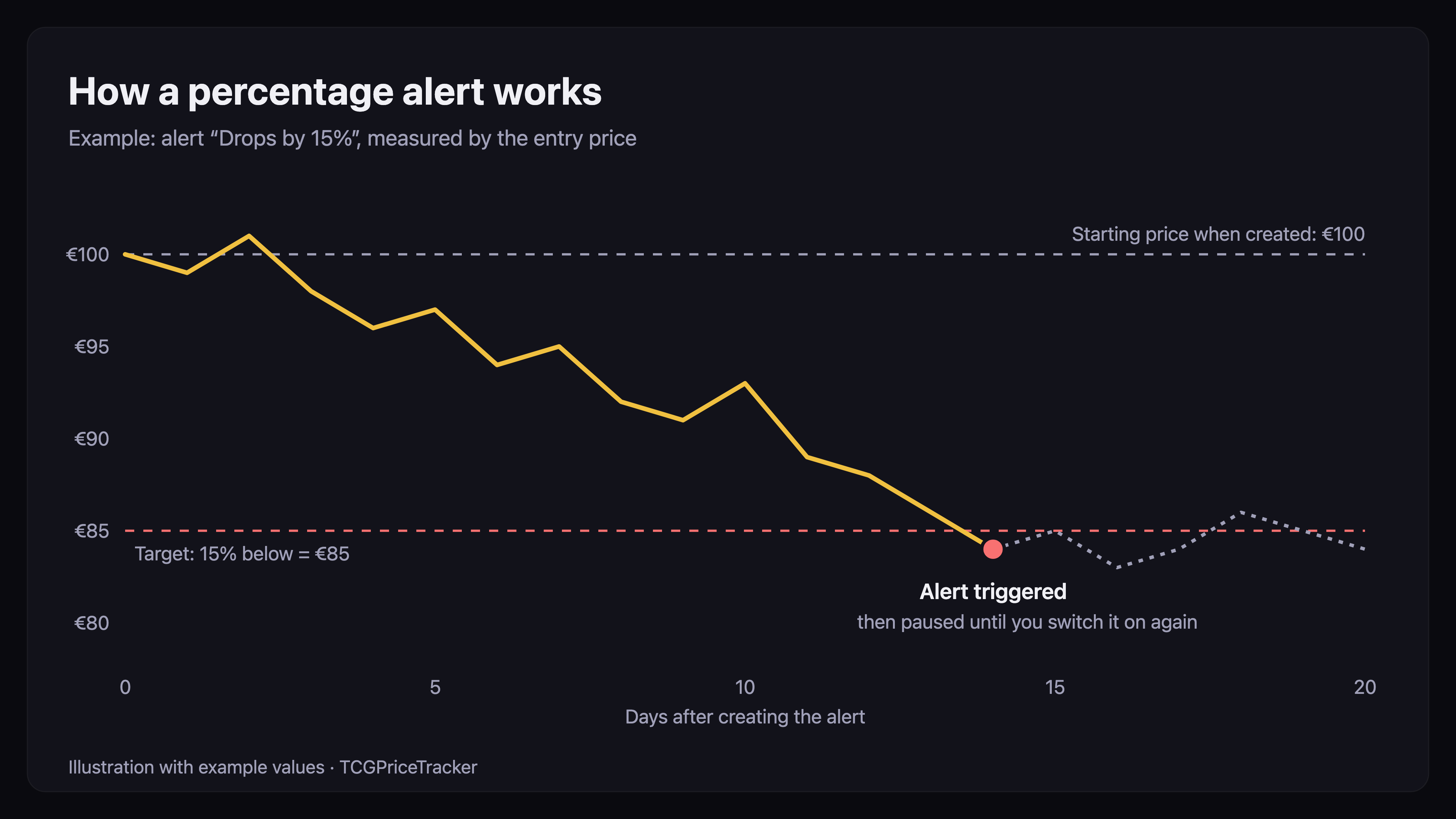
| Drops by % | the price falls x percent below the price when you created it | bargains without a fixed amount |
| Rises by % | the price rises x percent above the price when you created it | keeping an eye on gains |
Percentage alerts are handy when you have no fixed amount in mind: “Tell me when the card gets 15 percent cheaper than today.”
Set up a price alert in five steps
- Open the card or product on Cardmarket. Make sure the set and variant are right.
- Choose language and minimum condition in the filter. Both end up in the link and later determine which offers count.
- Copy the link from the address bar.
- Open the watchlist in TCGPriceTracker. Under “Watch a product”, paste the link into “Cardmarket URL”, choose a “Condition” and enter the “Target” — an amount or a percentage.
- Tick “Also notify via email” if you like and click “Add”.
If the link lacks the language, the form does not accept it and shows a note right below the field. Then choose the language on Cardmarket and copy the link again — that way the alert watches exactly the offers you mean.
What the alert measures against
The alert compares your target with the entry price: the average of the up to three cheapest matching offers on Cardmarket — in the language and at least the condition from your link, excluding shipping. A single strikingly cheap offer therefore carries less weight, and an offer far below the rest does not count at all, provided there are enough other offers to compare. How the entry price is calculated is explained in Cardmarket lowest price.
If there is currently no valid entry price, an alert with a fixed target measures against the Cardmarket trend; a percentage alert waits for the next valid entry price. In the watchlist you see both values per entry, and in the “To target” column how far there is still to go.
Percentage alerts measure from the starting price — the price when you created the alert. If you later change the condition, target or link, or turn the alert on again, the starting price is set anew. Like is always compared with like: entry price with entry price. If a card is new and its entry price has not been determined yet, the starting price follows with the first value.
What happens when it fires
Once a day in the early morning, after the price update, the tool compares all active alerts with the new prices. If a condition is met:
- a notification appears in the tool under the bell at the top,
- the watchlist entry shows “Triggered on …”,
- if you ticked it, an email arrives in the morning — all of the night's alerts collected in one message.
After that the alert pauses, so you do not get the same message every day. “Turn on again” makes it active straight away, as does changing the condition or target.
Tips for sensible target prices
Go by the entry price, not the From price. Without a filter, Cardmarket's From price mixes all languages and conditions. A target below it may never be reached.
For new sets, prefer percentages. Prices often fall markedly after release, as the October 2026 market report shows using 30th Celebration. An alert “Drops by 20%” fires without you having to guess the right amount.
Choose the language deliberately. The same card costs very different amounts by language — see Which language is worth more?. If you do not mind the language, an alert on the cheaper one pays off.
Set the condition realistically. Excellent is usually barely cheaper than Near Mint, from Good it gets noticeably cheaper — the figures are in Card condition and price.
When the alert fires: still check the seller and photos before buying, see Buying trading cards safely.
What you get for free
In the free account you can create up to 10 entries in the watchlist, each with its own alert. With Pro there is no limit. The watchlist works for singles and sealed products and for all games in the tool.
Set up your first price alert
Target price or percentage limit, measured by the entry price in your language and condition. Free, no credit card.
Start for free →Frequently asked questions
Does Cardmarket have a price alert?
Cardmarket offers an email alarm on the Wants list. According to Cardmarket's help, it notifies you once when a matching offer is listed. An alert that triggers at a specific price is not described by Cardmarket.
How do I set up a price alert for a card?
Open the card on Cardmarket, choose the language and minimum condition in the filter and copy the link. In the TCGPriceTracker watchlist, paste the link, choose a condition and target, and tick the email notification if you like.
What does the price alert measure against?
The entry price: the average of the up to three cheapest matching offers in the language and condition from your link, excluding shipping. If there is currently no valid entry price, an alert with a fixed target measures against the Cardmarket trend, while a percentage alert waits for the next valid entry price.
How often is the price checked?
Once a day in the early morning after the price update. Triggered alerts show up in the tool straight away; the emails arrive in the morning, collected in one message.
Why does an alert stay quiet after it has fired?
So that you do not get the same message every day, an alert pauses after it fires. One click on “Turn on again”, or changing the condition or target, makes it active again.
Is the price alert free?
Yes, in the free account for up to 10 watchlist entries. With Pro there is no limit.
Never miss the right price again
Watchlist with four alert types, checked daily, in the tool and by email. Start free, no credit card.
Start for free →